


Problem/Scenario:
You just applied one or more patches to your SharePoint 2013 farm and are ready to run the SharePoint 2013 Products Configuration Wizard. After launching the configuration wizard you receive a patch status error:

Some farm products and patches were not detected on this or other servers.
You know you just installed these so what's going on?
Resolution:
As long as you have installed all of the same patches on all servers, your farm just needs a refresh of the product versions.
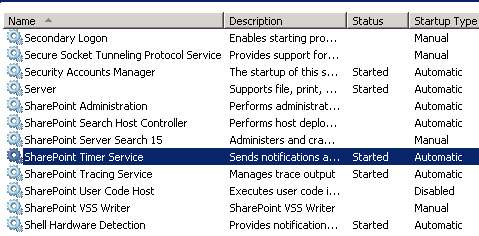
First, cancel from the configuration wizard and make sure the timer jobs are running on all servers:
 On the Job Definitions page, scroll down and locate the Product Version Job:

Click on the Product Version Job link to open the job definition. Click on Run Now at the bottom of the page:

You just applied one or more patches to your SharePoint 2013 farm and are ready to run the SharePoint 2013 Products Configuration Wizard. After launching the configuration wizard you receive a patch status error:
Some farm products and patches were not detected on this or other servers.
You know you just installed these so what's going on?
Resolution:
As long as you have installed all of the same patches on all servers, your farm just needs a refresh of the product versions.
First, cancel from the configuration wizard and make sure the timer jobs are running on all servers:
Next, in Central Admin, select Monitoring from the left-hand navigation and click the Review Job Definitions link under Timer Jobs:
Click on the Product Version Job link to open the job definition. Click on Run Now at the bottom of the page:
Now run the SharePoint 2013 Products Configuration Wizard again. You should be able to run it fully without any issues.


