


Problem: You attempt to use the External Item Picker in InfoPath 2013 and you receive a message and/or error message regarding Business Data Connectivity Services client components and/or the BCSLaunch.dll is missing.
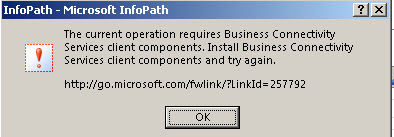
The messages you may receive are as follows:
 Solution
Originally I thought I needed to go to the link in the first message to install client components. That link takes you to Prerequisite software needed to work with external data in Office 2013. As of this writing there were only three (3) downloads. I figured I had the SQL components and obviously .NET Framework 4.0 so I decided to download and install the WCF Data Services 5.0 for OData V3. I thought this made sense since BCS now supports OData connections.
I probably didn't need that but, interestingly enough, after the installation, I received both the original message and then the BSCLaunch.dll is missing message appeared. On a different environment I never received the first message and it just went right to the BCSLaunch.dll is missing error message.
So anyway, the overall solution is a simple fix. You simply need to make sure you add Business Connectivity Services to your Office 2013 installation under the Office Shared Features:

Simple use the drop-down to select Run from My Computer:

Click Continue and Office will install the missing components.
After the installation is complete, you should now be able to add an External Item Picker onto your form without and errors or messages:

The messages you may receive are as follows:
The current operation requires Business Connectivity Services client components. Install Business Connectivity Services client components and try again.
The program can't start because BCSLaunch.dll is missing from your computer. Try reinstalling the program to fix this problem.
Originally I thought I needed to go to the link in the first message to install client components. That link takes you to Prerequisite software needed to work with external data in Office 2013. As of this writing there were only three (3) downloads. I figured I had the SQL components and obviously .NET Framework 4.0 so I decided to download and install the WCF Data Services 5.0 for OData V3. I thought this made sense since BCS now supports OData connections.
I probably didn't need that but, interestingly enough, after the installation, I received both the original message and then the BSCLaunch.dll is missing message appeared. On a different environment I never received the first message and it just went right to the BCSLaunch.dll is missing error message.
So anyway, the overall solution is a simple fix. You simply need to make sure you add Business Connectivity Services to your Office 2013 installation under the Office Shared Features:
(You can get to here through Control Panel -> Programs and Features -> right click Microsoft Office Professional Plus 2013 and select Change -> click Continue with Add or Remove Features selected.)
Simple use the drop-down to select Run from My Computer:
Click Continue and Office will install the missing components.
After the installation is complete, you should now be able to add an External Item Picker onto your form without and errors or messages:

